
Modeling CULTEC, Inc. Chambers In Hydrocad – Using The Chamber Wizard
 Download PDF
Steps for Using the HydroCAD Chamber Wizard
 The chamber wizard is a revolutionary tool for doing underground storage layout and modeling. In just a few steps you can layout a complete drainage field and create the storage elements used by HydroCAD to perform the actual hydrograph routing calculations.
Step 1: Select a chamber from the library
Step 2: Set the chamber spacing, bedding and cover. Or just check a box to automatically use the manufacturer’s recommended parameters.
Step 3: Adjust the number of chambers until you achieve the desired layout and overall storage. As you adjust any of the parameters, the storage analysis and layout sketch are instantly updated:
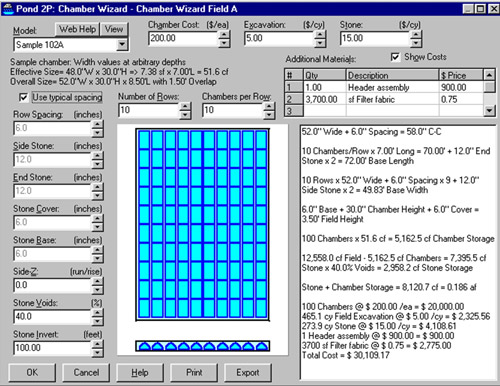
The wizard can even be used to calculate the total system cost. Just enter your costs for the chamber, excavation, and stone, and everything instantly appears in the report. You can also include additional materials or comments, so that the final report contains all the relevant information.
When you save the wizard, HydroCAD automatically creates the appropriate storage definitions for the stone and embedded chambers. To perform a complete hydrograph routing, just add your outlet devices and inflow hydrograph!
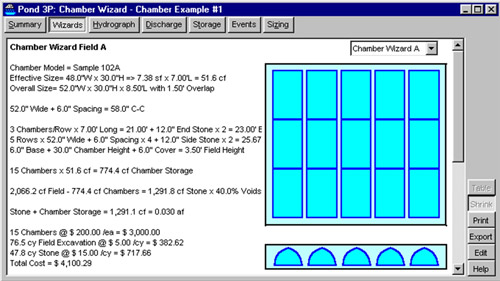
For further details please read about pond calculations, pond storage, and underground storage chambers at www.hydrocad.net
For technical support, pricing and ordering of HydroCAD software, please contact HydroCAD Software Solutions LLC at 1-800-927-7246 or 603-323-8666.
We are able to assist you in your design by performing preliminary calculations and supplying AutoCAD layouts free of charge